
Adding website keywords is vital to your marketing strategy and in helping your ideal clients find you online. You’ve seen and heard all the experts talking about how important it is. Actually doing it right though can be easier said than done if you don’t have a guide.
Don’t worry though, nailing this isn’t as difficult as you think. Like many things, there’s a formula; once you have that, things get much simpler. All you have to do is follow it, and watch your results improve!
In this article, I’ve set out, step-by-step how to implement your website keywords in a simple checklist. When you’re done, you can finally get more, higher-quality leads landing on your website.
First, let’s quickly cover the terminology:
Website Keywords: These are a word or phrase that tell search engines what the content on your website is about. It also refers to what people pop into search engines. If what they’re searching for matches the keywords used on your site, that’s how you show up in the search results. Your position in the results (ranking) depends on a number of factors. Getting your website keywords right is a very important one in your overall SEO strategy.
Focus keyword: You may have several keywords that you want your content to rank for, especially if your content is long. The focus keyword, however, is the primary keyword or phrase you want to rank for. It is used in your title, URL, meta description, text and images.
Long-tail keywords: These contain 3 or more words and are really effective in targeting a very specific market. For example, “Life Coach” is a very broad keyphrase and would have a tonne of competition. Therefore, it would be difficult to rank well for it. A long-tail keyword though such as “Melbourne Self Esteem Coach” is more specific, making it easier to rank as well as reach a more targeted audience.
SEO: Simply put, SEO (Search Engine Optimisation) is a combination of practices put in place to improve your appearance and ranking in search engine results. It includes things like keywords, using headings correctly, image alt tags, appropriate linking and more. As this article is focused on optimising your website keywords, we’ll just stick to that.

You need to find which search terms your target market is entering into search engines. Don’t just assume you know them. For best results, take the time to do some research. You might be surprised and even uncover some interesting and useful results.
For example, say you’re a relationship coach who offers support to those going through a divorce. Terms your potential clients might search for could include “How to cope with divorce”, or “dealing with divorce.” If you’ve written an article on these specific topics and optimised your keywords, you not only increase your chances of ranking higher (and getting more clicks!) but also increase your chances of reaching a very targeted audience and your ideal clients.
The point here is that you know your business inside out. So, your mindset of what you would search for online will vary from the mindset of your target market. Take the example above again. Some people may not even be aware of coaches that specialise in helping people through a divorce. So, they’re unlikely to search for your services specifically (e.g. “Divorce Coach”). After using the above search terms though, they could come across your website and find a really helpful article, initiating their customer journey with you. ?
Once you have your keywords and have determined your focus keyword for your page, post, product etc. It’s time to optimise them. Here’s how…
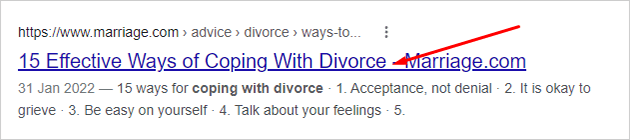
This is the blue link in Google search result pages that users click to go to your website. It is propagated either from your content or whatever you input into your SEO plugin or app (for WordPress users I recommend Yoast or RankMath).
Focus Keyword: coping with divorce
Title Tag: Coping with Divorce: An essential guide to heal and move forward
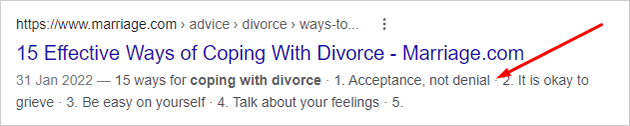
This is the snippet of text that appears below your Title Tag in search result pages. If the keywords being searched for are within your meta description, search engines will also make them bold, making them more visible and increasing your chances of click-throughs.
Focus Keyword: coping with divorce
Meta Description: Coping with divorce can be intensely painful, causing substantial grief & stress. Our tips will help you process your emotions, heal & start to move on
This is your page link. For example, www.yoursite.com
URL from the title:
www.yoursite.com/coping-with-divorce-an-essential-guide-to-heal-and-move-forward/
URL shortened and stop words removed:
www.yoursite.com/coping-with-divorce-guide-move-forward/
URL with focus keyphrase only:
www.yoursite.com/coping-with-divorce/
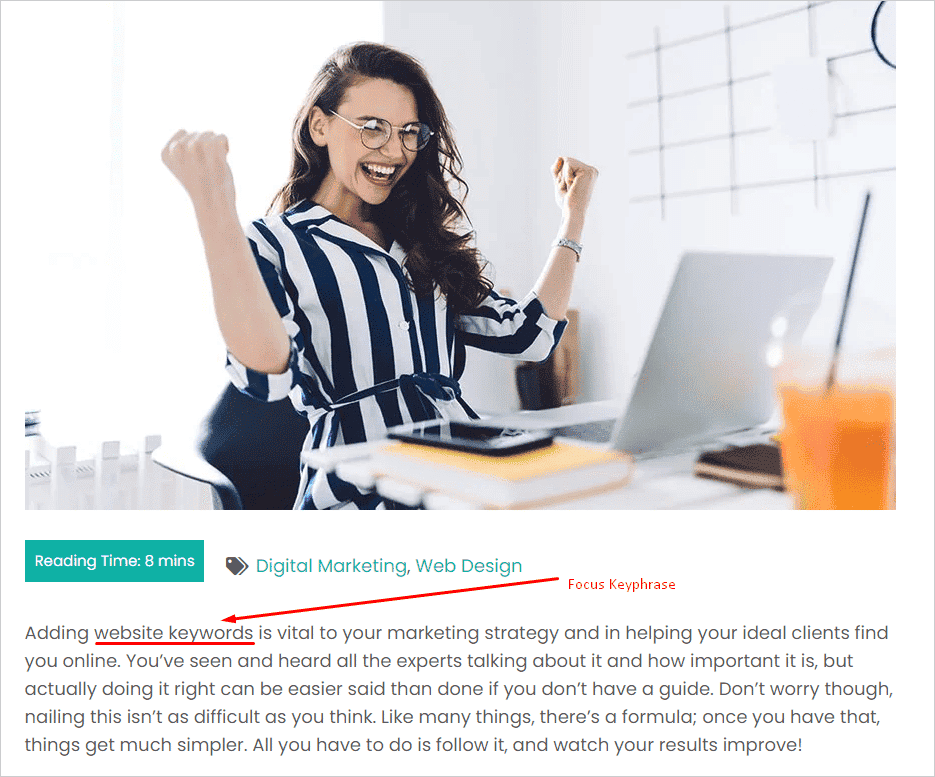
Your focus keyphrase should also be at the very beginning of your content. This reinforces what your content is about and also reassures site visitors that what they have clicked through to is what they are looking for (i.e. it’s not clickbait!)
We’ve already discussed including your focus keyphrase in your title (which if your website is set up properly should be a H1 tag). You should also include it in your sub-headings, i.e. H2, H3, etc. and body content (paragraphs).
An ALT tag specifies an alternate text for an image and improves accessibility for people who either can’t see the images or if they failed to load. Furthermore, they help search engines better understand not only what the image is about, but what your page’s subject matter is. They are also useful as anchor text should the image be used as a link.
Here’s a handy article on how to add ALT tags for your WordPress website as well as some more best practice guidelines.
On a final note, I fully appreciate that for many people, optimising your website keywords isn’t as much fun as other aspects of your business. Some put it off altogether because it’s boring, or they don’t think they will get it right. But even some SEO is still far better than none. So, have a crack and do the best you can. Give yourself time to get better at it and before you know it, it will just be part of the routine that you barely notice each time you create new content.
The whole point of this article is to help improve your chances of getting more eyes on your website, more leads and more conversions. Yep, this stuff isn’t glamorous. But, it’s a vital tool in making the above happen. Again, it may be tedious and individually each item on the checklist probably doesn’t seem that consequential. Remember though, “A waterfall begins from only one drop of water. Look what comes from that…”


Discover how to effectively build trust & credibility, appeal to your audience in a way that truly resonates, and results in them saying…
This is exactly what I was looking for, I must have this now!!