The post Nail your website keywords to improve SEO & website clicks appeared first on Rivmedia Web Design.
]]>Adding website keywords is vital to your marketing strategy and in helping your ideal clients find you online. You’ve seen and heard all the experts talking about how important it is. Actually doing it right though can be easier said than done if you don’t have a guide.
Don’t worry though, nailing this isn’t as difficult as you think. Like many things, there’s a formula; once you have that, things get much simpler. All you have to do is follow it, and watch your results improve!
In this article, I’ve set out, step-by-step how to implement your website keywords in a simple checklist. When you’re done, you can finally get more, higher-quality leads landing on your website.
First, let’s quickly cover the terminology:
Website Keywords: These are a word or phrase that tell search engines what the content on your website is about. It also refers to what people pop into search engines. If what they’re searching for matches the keywords used on your site, that’s how you show up in the search results. Your position in the results (ranking) depends on a number of factors. Getting your website keywords right is a very important one in your overall SEO strategy.
Focus keyword: You may have several keywords that you want your content to rank for, especially if your content is long. The focus keyword, however, is the primary keyword or phrase you want to rank for. It is used in your title, URL, meta description, text and images.
Long-tail keywords: These contain 3 or more words and are really effective in targeting a very specific market. For example, “Life Coach” is a very broad keyphrase and would have a tonne of competition. Therefore, it would be difficult to rank well for it. A long-tail keyword though such as “Melbourne Self Esteem Coach” is more specific, making it easier to rank as well as reach a more targeted audience.
SEO: Simply put, SEO (Search Engine Optimisation) is a combination of practices put in place to improve your appearance and ranking in search engine results. It includes things like keywords, using headings correctly, image alt tags, appropriate linking and more. As this article is focused on optimising your website keywords, we’ll just stick to that.

First, choose which website keywords to use
You need to find which search terms your target market is entering into search engines. Don’t just assume you know them. For best results, take the time to do some research. You might be surprised and even uncover some interesting and useful results.
For example, say you’re a relationship coach who offers support to those going through a divorce. Terms your potential clients might search for could include “How to cope with divorce”, or “dealing with divorce.” If you’ve written an article on these specific topics and optimised your keywords, you not only increase your chances of ranking higher (and getting more clicks!) but also increase your chances of reaching a very targeted audience and your ideal clients.
The point here is that you know your business inside out. So, your mindset of what you would search for online will vary from the mindset of your target market. Take the example above again. Some people may not even be aware of coaches that specialise in helping people through a divorce. So, they’re unlikely to search for your services specifically (e.g. “Divorce Coach”). After using the above search terms though, they could come across your website and find a really helpful article, initiating their customer journey with you. ?
Some tools to help you with your website keywords research:
- AnswerThePublic – get instant, raw search insights, direct from the minds of your customers. You can search 3 keywords per day for free.
- Google – pop in a keyword and look through the results for inspiration for more. Plus, down the bottom, Google even generates a list of “Related Searches”
- Google’s Keyword Planner – Find the right keywords with their research tool.
- Google Trends – This is a handy tool that analyses the popularity of search queries and compares search volume
- Ubersuggest is great for helping you discover new keywords. You can get a lot of data with the free option.
Once you have your keywords and have determined your focus keyword for your page, post, product etc. It’s time to optimise them. Here’s how…
1. The Title Tag
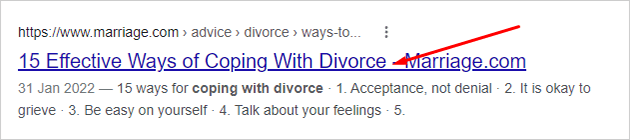
This is the blue link in Google search result pages that users click to go to your website. It is propagated either from your content or whatever you input into your SEO plugin or app (for WordPress users I recommend Yoast or RankMath).
Tips:
- Your focus keyword should be within the title and for best results, place it right at the beginning
- Your page title should be a H1 heading and there should only be one H1 heading, the rest should be sub-headings; H2-H6)
- Always try to include emotional words, power words or numbers (try Coschedules headline analyser for more info… and to make your titles more engaging!)
- It should be no more than 55-60 characters in length to ensure the whole title is visible (on desktops and mobile devices)
- You should always have unique title tags, don’t duplicate the same title tags on more than one page of your website
Example:
Focus Keyword: coping with divorce
Title Tag: Coping with Divorce: An essential guide to heal and move forward
2. The Meta Description
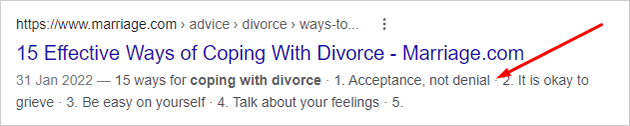
This is the snippet of text that appears below your Title Tag in search result pages. If the keywords being searched for are within your meta description, search engines will also make them bold, making them more visible and increasing your chances of click-throughs.
Tips:
- Include your focus keyword in the meta description. There isn’t an ideal location, just as long as it’s in there. Also, be sure to accurately summarise your page’s content, and make it engaging.
- It should be no more than 155-160 characters in length to ensure the whole snippet is visible (on desktops and mobile devices)
- As with title tags, you should always have unique meta descriptions, don’t duplicate them on more than one page of your website
Example:
Focus Keyword: coping with divorce
Meta Description: Coping with divorce can be intensely painful, causing substantial grief & stress. Our tips will help you process your emotions, heal & start to move on
4. URL
This is your page link. For example, www.yoursite.com
Tips:
- Remove less powerful words or stop words (and, or, but, of, the, a, etc.) to make it simple and precise, just make sure your focus keyword is still in there and that it makes sense.
- Shorter URLs have been shown to have a better chance of ranking higher than long URLs. There’s no hard and fast rule for the length, but aim to keep it as close to 75 characters or less. See our examples below.
- Use all lowercase letters and separate each word with a hyphen (-), don’t use underscores (_)
- They should be easily readable both by humans and search engines. In this URL for example, www.mysite.com/post?ID77&kw=coping+divorce – you can guess what the page’s content will include but it isn’t as clear as it could be
- Avoid using dynamic URLs when possible. This is a URL where the content for the page is pulled from the database. You can usually spot them as they include characters like: ? + &. They look messy and aren’t SEO friendly
- Don’t keyword stuff, your focus keyword should only be in the URL once.
Example:
URL from the title:
www.yoursite.com/coping-with-divorce-an-essential-guide-to-heal-and-move-forward/
URL shortened and stop words removed:
www.yoursite.com/coping-with-divorce-guide-move-forward/
URL with focus keyphrase only:
www.yoursite.com/coping-with-divorce/
5. Keyphrase in Introduction
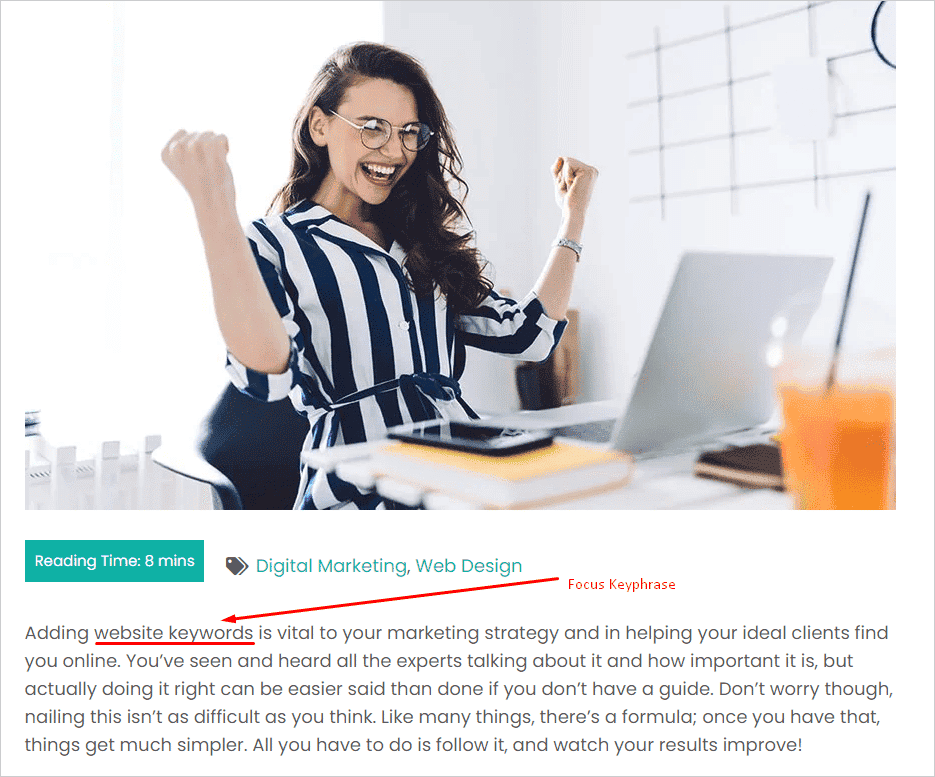
Your focus keyphrase should also be at the very beginning of your content. This reinforces what your content is about and also reassures site visitors that what they have clicked through to is what they are looking for (i.e. it’s not clickbait!)
Tips:
- Different plugins/apps will give different guidelines, such as it being within the first 10% of the content or within the first 100 words. A good rule of thumb is to make sure it is included within the first sentence
- This first sentence should be SEO optimised, but also still needs to make sense and sound natural. Another rule of thumb; write for your site visitors first and Google second
5. Sub-Headings and page content
We’ve already discussed including your focus keyphrase in your title (which if your website is set up properly should be a H1 tag). You should also include it in your sub-headings, i.e. H2, H3, etc. and body content (paragraphs).
Tips:
- Google pays the most attention to your H1 and H2 headings. However, the others are not ignored and should also be considered in your website keywords strategy.
- Many site visitors scan content, that’s why it’s also important to include your keywords in your headings to help grab their attention
- Seeing as the focus keywords should be related to the topic of the post, including them within your content (paragraphs, not just headings) should happen naturally, just ensure you don’t overdo it. Not only does it get irritating for readers to see the same words over and over again, but including them too many times can lead you to be penalised by Google if they see it as keyword stuffing
- There is no set rule for how many times your keyword should appear in your content, especially as the amount of content each page/post has can vary significantly. As a guide, aim for a density of 1-1.5%. What this means is for every 100 words, the keyword should appear 1 to 1.5 times.
- If in doubt, you are better off having a low keyword density than one that is too high. Keep your language natural; if the search engines don’t penalise you for it, your site visitors definitely will!
6. Image Name & ALT tags
An ALT tag specifies an alternate text for an image and improves accessibility for people who either can’t see the images or if they failed to load. Furthermore, they help search engines better understand not only what the image is about, but what your page’s subject matter is. They are also useful as anchor text should the image be used as a link.
Tips:
- Make the ALT text useful, informative and use keywords appropriately
- Avoid filling all image ALT tags with the same keywords over and over (this is also keyword stuffing)
- Don’t forget the image file name: Name it appropriately with hyphens separating each word, no funny characters, and all lowercase
- Naming your image and using appropriate ALT tags will also help in having your image show up in Google Image search results
Here’s a handy article on how to add ALT tags for your WordPress website as well as some more best practice guidelines.
And voilà, that’s it! ?
On a final note, I fully appreciate that for many people, optimising your website keywords isn’t as much fun as other aspects of your business. Some put it off altogether because it’s boring, or they don’t think they will get it right. But even some SEO is still far better than none. So, have a crack and do the best you can. Give yourself time to get better at it and before you know it, it will just be part of the routine that you barely notice each time you create new content.
The whole point of this article is to help improve your chances of getting more eyes on your website, more leads and more conversions. Yep, this stuff isn’t glamorous. But, it’s a vital tool in making the above happen. Again, it may be tedious and individually each item on the checklist probably doesn’t seem that consequential. Remember though, “A waterfall begins from only one drop of water. Look what comes from that…”

The post Nail your website keywords to improve SEO & website clicks appeared first on Rivmedia Web Design.
]]>The post Kick-Start the New Year with this simple, yet important website update appeared first on Rivmedia Web Design.
]]>We’re at the start of the New Year which is often a time when people think about making updates to their websites. One change that is incredibly important to make is also a task that so many overlook. Your website copyright date.
Ok, so it’s not as exciting as adding new products, changing some images, or uploading a new blog post. But, it’s more important than most people realise, for 2 crucial reasons:
- To build trust and boost your brand’s reputation
- To protect your hard work and IP (intellectual property)
A quick note: The following information is for guidance only. I’m not a solicitor so this is not legal advice. It is written based on my knowledge of online marketing, website best practices, and Australian copyright law.
Now that I’ve covered my bum ? ?… For those that aren’t well-versed in website copyright, I have provided a quick and straightforward explanation of what it entails below. Then we can dive into why keeping it up-to-date is so important.

What is a website copyright notice?
It is a notice saying that the work within the website is owned by you and is protected by copyright laws. This protection gives you the right to control how your material is used and most importantly, prohibits others from copying or using it without permission.
The good news for Australians is that as soon as you publish material online (blog post, written content, photos etc.), copyright ownership is automatically applied.
Things get a little more complicated when it comes to your website’s code and design, but that isn’t relevant to this particular post (important to chat about it with your web developer though). The main thing you need to know is this:
With the exception of working directly for an employer (does not include freelancing), unless they agree to transfer it, the person who created the material owns the copyright.
If you want more information on copyright issues concerning the creation and management of websites, the Australian Copyright Council has a very useful Fact Sheet you can download here.
If copyright is automatically applied, why do I need a copyright notice?
In short, because some people suck. ?
Content theft is prevalent on the internet. A common (and annoying!) misconception is that if something is online; because it’s readily available you are welcome to do what you please with it. This is not true. ?
Another reason is that some people are just jerks who steal content instead of investing the time and/or money to create their own. ?
Adding a copyright notice on your website is not a legal requirement to assert your rights, but it does make your ownership of the content clear and will hopefully help to discourage theft.
Why an up-to-date website copyright notice is so important
1. To build trust and boost your brand’s reputation
When a visitor lands on a site that has last year’s date (or worse, even older! ?), many will assume the content is also outdated and therefore of low value.
Or, it could even leave them with the impression that if the owner can’t be bothered to stay on top of such a simple task, what else are they neglecting? Are they lazy, disinterested or just don’t care?
We all know how important first impressions are and your website is often the first place people will go to check out your business. When it comes to websites, people do judge a book by its cover and will form an opinion quickly.
So, an outdated website can often come off as unprofessional and negatively influence how a customer perceives your business.
I explore this further in this article too if you’re interested:
How often should I redesign my website?
Your copyright date may be a small piece of the puzzle, but it all adds up and contributes to how you are perceived online.
Conversely, displaying the correct date will subsequently have the opposite effect.
You will help to build trust and authority by leaving visitors with the impression that your site is up with the latest trends and information. It also demonstrates that your website and online presence matter to you, and in turn, so do your customers.
2. To protect your hard work and IP
As mentioned above, content theft is sadly not uncommon, so by including a current copyright notice you are providing yourself with some extra protection. It also helps should an infringement occur and you need to take legal action.
A lot of time and/or money goes into creating the content that goes up on your website. So, having that content stolen can be really disheartening (not to mention aggravating!). Hence, doing what you can to avoid this experience is…
How to nail your website copyright notice
To be the most effective, you want your notice to be visible on every page of your site, which is why you will usually find it within the footer.
And, to be valid, it needs to include 3 parts:
- The copyright symbol ©, or the words “Copyright” or “Copr.”
(You can use one or the other, or both.) - Current year
- Name of the copyright owner
Current year: As websites are regularly updated, you have two options here. You can either provide the current year (2023).
Or, a date range indicating the year of original publication to the most recent (2014-2023). Either option is fine, it’s just a matter of preference. I personally prefer to keep it simple and just have the current year.
Name of the copyright owner: For individuals, you can simply use your name. It’s preferable that you use your legal name (i.e. not a pseudonym, handle or alias).
For businesses, you need to use your registered company name (not trading name) for the notice to be valid. For example, here’s my copyright notice: © 2023 Rivmedia Pty Ltd.
You will observe that it states Rivmedia Pty Ltd as that is my company name. Rivmedia Web Design is my trading name and as such is not a legal entity that can own IP.
Final Thoughts
Keeping your copyright date current is one of the simplest tasks to complete yet can have an impactful result. More so when combined with staying on top of your other updates and marketing strategies also.
So, kick off the New Year on a positive note. Show your visitors that you are up to date, that you care, and you’re on your game ?

Need help with your website updates or marketing strategies?
Chat with me today to create a digital marketing plan for your best year yet!
The post Kick-Start the New Year with this simple, yet important website update appeared first on Rivmedia Web Design.
]]>The post Why is my website traffic so low? (and what to do about it) appeared first on Rivmedia Web Design.
]]>If you build it, they will come
After investing time and money into a website, there’s nothing more frustrating than low website traffic. In this article, we list the main factors that can affect site visits & what you can do to increase them.

So many times I see people who mistakenly think that just because they launch a website, site visitors will automatically come. Truth is, this is not Field of Dreams and just because you build it does not mean customers will magically appear, no matter how good your website is.
Think of it this way, if you held a party but didn’t send anyone an invite, how many people would even know about it, let alone turn up?
Beyond that, even if you are promoting your website gaining those clicks is getting harder and harder. It’s mandatory for practically all businesses to have a website now so the internet is heavily saturated with competition making it difficult to rank well and stand out from the crowd.
Factors that can affect website traffic & what you can do
Brand New?
If your website is brand new it won’t just appear in search engine results immediately. First, your site has to be submitted to search engines and then they need time to crawl your site and index it. Be patient and make sure everything is done on your end (site submission, sitemaps etc.) to help this process.
Hopefully, your web designer has already done this for you, but if not, here’s a great article to help you out: How to Submit Your Website to Search Engines.
SEO (Search Engine Optimisation)
It goes without saying that having a quality website to begin with is an important factor but not just in how it looks, but in how it performs too. A lot of the factors covered below can be held under the umbrella of SEO and if you manage them all: Good SEO = better ranking = increased website traffic.
Your website has to be optimised to help get people to it in the first place. This is where in-site SEO comes in, such as appropriate use of keywords, proper use of titles and meta descriptions, quality code, optimised images and so on.
This is such a large field it’s impossible to cover everything, so my advice on this point is to either ensure you find yourself a web developer that is proficient with it or be willing to invest a good deal of time in educating yourself about it.
Use social media

The impact of social media on website traffic is two-fold. Firstly, if you have reasonable engagement and social shares, these can help your Google ranking as well as expose you to a wider audience. Secondly, the posts themselves can drive traffic to your site via page links, blog posts etc.
Best of all, you can take advantage of all of this for free! Of course, you can use the paid facilities to boost things further, but if you’re sharing quality content you might not need to spend a cent.
If the thought of posting regularly on social media makes you cringe, there are a few options to consider. Firstly, there’s a huge market for social media managers out there, so if you have the budget, outsource it!
However, if you need to manage it yourself and posting regularly is too hard, aim for at least once a week or even once a fortnight… anything is better than nothing. There’s a range of scheduling tools that are available to help make this easier; Facebook, for example, has its own in-built scheduling tool and one of my personal favourite all-rounders is Later.
Don’t forget why you’re reading this article;
you want more website traffic and social media is an effective way of getting it.
Finally, choose your platforms wisely; you don’t have to be on all of them. For example, LinkedIn is effective for B2B companies, whereas creative businesses tend to have better engagement on Instagram & Pinterest.
Find out which ones are best for your industry and stick to them. Setting up a page isn’t enough, you need to be active on your accounts. So if time, motivation and/or budget are a problem, I suggest choosing 2 and doing those well.
Are you blogging?
Blogging can be time-consuming and at times tricky to come up with new content, but it’s a worthwhile exercise. By creating regular new content you can achieve the following;
- Provide helpful and/or engaging content that your readers will appreciate (which hopefully results in a share or purchase)
- It shows Google that your website (and business) is active and fresh thus helping your ranking (Google doesn’t favour stale websites)
- If you blog quality content, it too will rank well and drive more traffic to your site
- It also provides additional content you can share on social media.
Google Analytics
If you’re not utilising Google Analytics, you should be! It’s a great tool for understanding your site visitors and how they engage with your website. It provides insights into what you are doing well and what you can improve.
What works is always changing so this is an ongoing process and one you should get used to checking in on. It takes a while to build up enough data to start analysing it, but once your site has been up for at least a few months you can start experimenting and tweaking.
Poorly performing website
If a website takes too long to load, is difficult to navigate, confusing, unattractive, or just plain boring people can be pretty brutal and leave very quickly. This can affect what is called your “bounce rate.” A high bounce rate (where people leave your site quickly) can be interpreted by Google that your site is obviously of little value, which can lower your rankings.
If you have google analytics installed you can check a number of statistics including bounce rates to help you determine what changes you need to make to improve things.
Mobile-friendly & secure websites

With a huge number of website traffic coming from mobile phones, a responsive website is no longer optional but a must. If people can’t easily view and use your site on mobile, this too can affect your bounce rate which = lower ranking and less traffic.
Furthermore, the responsiveness of your site is a contributing factor to how Google ranks your site and you will be pushed lower than your competitor’s sites if you’re not meeting best practice guidelines. The same goes for sites that don’t have an SSL certificate (security for your website).
Here are a couple of related articles that explain the above in more detail:
Website not secure? – Here’s how to fix it
Is Your Website Mobile Friendly?
Keyword-focused content
Keywords are the terms and phrases that people enter into a search engine to find you online. So when writing your content you need to put yourself in your customer’s shoes, determine what they will search for and write your content accordingly. Doing this well will give you a better chance of your content showing up among the results.
At the same time, this has to be done the right way and if you go too far with it (this is called keyword stuffing) it can actually work against you and lower your rankings. A good rule of thumb is to keep keywords and SEO in mind, but write for your audience first and Google second.
Backlinks
No website was meant to be an island, but rather a part of a much larger interconnected “web” (www = world wide web). The number of backlinks your site has is an indication of its popularity and importance so to google these act as a thumbs-up so to speak because your content is obviously valuable if people are happy to link to it.
As with keywords, there are certain do’s and don’ts to avoid being penalised.
Do:
- Create great content that people want to link to
- Share on social media
- Comment on other websites/blogs with relevant content – but don’t spam!
- Guest post
- Ensure your backlinks are quality links
- Ask clients to link to your content
Don’t:
- Pay for backlinking schemes
- Send spammy emails asking for backlinks
- Inject links into other websites
Final Thoughts
As you can see there are a number of factors that affect the amount of website traffic your site can receive. A lot of these factors may require professional assistance such as SEO (both in-site and external), content creation, social media management and so on. However, with a little time and education, there’s a lot you can do yourself with little financial investment.
It’s also prudent to remember that this is an ongoing process that you have to be consistent with.
The post Why is my website traffic so low? (and what to do about it) appeared first on Rivmedia Web Design.
]]>The post Which website platform is best for my business? (Part 1) appeared first on Rivmedia Web Design.
]]>Website platform comparisons
With so many options how do you choose the best website platform for your business? We compare the most popular ones to help you decide.
Glossary:
Before we dive in, here’s a quick glossary of terms that pop up from time to time:
CMS – Content management system: the software used to manage your website content and allow you to create, edit, and publish.
SEO – Search engine optimisation: how you get found on search engines (i.e. Google)
eCommerce – Adding the functionality of people being able to make purchases through your website
Design – how the website looks
Functionality – the features used on the website (online forms, sliders, etc.)
Apps & plugins – software that extends the functionality of the platform, e.g. a plugin to create contact forms
Website maintenance – all CMS platforms require ongoing maintenance, just like you would for a car to keep them running well. Maintenance is taken care of as part of the price of some platforms, others you have to manage it yourself (by doing it yourself, or outsourcing to someone who can)
Reading time: about 5-6 minutes
As a business owner, you know that a website is one of your most important marketing tools. 75% of consumers admit to making a judgement on a company’s credibility based on their website design. As such, careful consideration needs to be made to ensure it is created to best suit your needs and appeal to your audience.
With so many website platforms to choose from though how do you decide which one is right for your business?
In this two-part article, I’ll provide an overview of the most popular platforms to help you determine which one is right for you covering Customisability, Cost, Site Speed, Security, Support, SEO, and Ease of Use.
Based on usage statistics and current trends, I’ll be comparing the following website platforms:
- WordPress
- Joomla
- Drupal
- Squarespace
- Shopify
- Wix
To begin with, we’ll start with the most popular CMS (Content Management System) platforms; WordPress, Joomla and Drupal.

WordPress
WordPress is the most popular website platform powering 40% of all websites on the internet and holds a massive 64% of the known CMS market. It’s popularity and continual growth can be attributed to a number of factors. Most notably; the vast amount of design and functionality options and its usability.
- Customisability – There are around 5,000+ free themes and 54,000+ free plugins available from the WordPress.org directories, plus thousands of premium themes & plugins across various sites, all of which can be customised. WordPress can be molded into any type of website you want and provide pretty much any functionality you can think of.
- Cost – Depending on the complexity of your site, the majority of people will need to hire a developer to build your website for you. Afterward, it will require regular ongoing maintenance and updates which (with education) you can do yourself or outsource to a professional if you prefer. Other costs (hosting, paid plugins) are very affordable to run for the majority of websites. Some bigger, more complicated sites may require larger hosting plans to accommodate as WordPress tends to be resource-heavy.
- Site Speed – Performance is often cited as a weak spot of WordPress but with the right tools in place and regular maintenance, it can be manageable.
- Security – Due to its popularity WordPress is a bigger target for hackers. However, more often than not it is the user that creates vulnerabilities. As long as best practices are met, security is not a major issue. Furthermore, with automatic security updates to WordPress’ core, risks are minimised.
- Support – Some on-going support (depending on your skill level) is usually required from time to time but can be obtained for free via the large online WordPress communities available. When necessary there is also an abundance of developers proficient with WordPress who are also available.
- SEO – Search engine optimisation is pretty good out of the box and can be extended further with plugins like Yoast SEO.
- Ease of Use – Writing blog posts and making minor content changes is fairly simple for most but there is still a learning curve. Page builders are available and have been designed with being “user-friendly” in mind. For more complex changes, a designer is often required.
Types of websites you can build with WordPress:
Any! Originally created as a blogging platform it does this best, but over the years has expanded to offer functionalities to run any type of website; a blog, information website, directory, online shop, membership site, a combination of all of the above, you name it. There really isn’t any limit to the kind of site you can build with WordPress and it will suit the majority of businesses. The only exception where it might not be ideal (being resource-heavy) is large scale websites (1000’s of pages + very heavy traffic).
Final Thoughts
WordPress offers users a lot of choices right from the beginning which might be confusing at first but is very flexible in the long run. It’s a platform that you can constantly build on as your business grows which makes it continually adaptable. If you are looking for full customisation, easy access to support, an abundance of features, and unrestricted growth potential, WordPress is a great choice. Initial investment is required to develop your site and you will need to invest either your time or money to continue running it, but it is still a very affordable platform.

Joomla
Joomla is the second most popular CMS on the web with a 6.7%% market share. The technology behind Joomla is similar to that of WordPress
- Customisability – Joomla has around 8,000 extensions listed at the official Joomla library. As there’s no official template library though numbers are hard to come by. As a guide, there are just under 1000 premium themes available on one of the most popular theme websites: Theme Forest. Customisation of both is possible but can be a little more complicated compared to other platforms.
- Cost – Since Joomla is a little more complex than WordPress, the likelihood that you will need professional help with regard to both building the site and its ongoing maintenance is higher. Other costs (hosting, paid plugins) are very affordable to run.
- Site Speed – Joomla has a good reputation concerning performance, primarily as it has performance-boosting functionality already built-in.
- Security – Much of the responsibility on keeping your site secure falls on the user and with best practices met, security isn’t a major issue. However, there are no automatic updates which do increase vulnerability a little so you have to remain vigilant with your updates.
- Support – As the second-largest open source CMS on the web, Joomla also has a good free support community in place and developers are usually easy to come by
- SEO – Joomla has some standard features out of the box but further extension is a bit complicated to implement.
- Ease of Use – In terms of complexity, Joomla is somewhere between WordPress and Drupal so if you’re reasonably tech-savvy you should be able to get a handle on it but beginners might find it too complicated unless they have sufficient time to learn. Joomla offers page builders also to help users with design and content.
Types of websites you can build with Joomla:
Similar to WordPress, Joomla is very adaptable with the types of websites you can create with it, from simple information websites to complex e-commerce sites. If anything its a little more flexible than WordPress in that you can make a lot of customisations without relying on as many extensions/plugins. However it’s worth noting that, Joomla’s market share is declining due to factors including ease of use, price, availability of developers/support, and so on.
Final Thoughts
If you are looking for a middle ground between out-of-the-box power and user-friendliness or a good option for social networking and e-commerce, Joomla might be the one for you. It has a steeper learning curve, a smaller ecosystem (of templates, extensions, and support) and is less SEO friendly. It’s still a very solid option though used by big brands.

Drupal
Drupal has been around longer than the above platforms but has slowly been declining in popularity due to various reasons; it currently has a market share of around 2.2%. It too has similar technology to WordPress and Joomla but of the three is the most technically advanced CMS.
- Customisability – Drupal is all about building custom websites and there is very little that you can not customise with it. The admin area offers a lot of customisation options from the get-go giving you much control over your site. It is part of a healthy ecosystem offering 40,000+ modules and more than 2,600 themes to add functionality and design options to your site. Due to enforced coding standards, they are also basically guaranteed to work together.
- Cost – Drupal was made with fast performance a key component. Consequently, it is less resource-heavy than its competitors which is good news for hosting costs. On the other hand, being a very complicated CMS all but guarantees you will need a competent developer to both build and maintain it, and being more complicated usually requires a larger investment.
- Site Speed – Drupal is known for producing the fastest-loading websites being less resource-intensive. Keep in mind though that just like the other CMS, it can be slowed down if best practices aren’t met.
- Security – Security is one of Drupal’s strong suits and the CMS is very safe out of the box. Should a vulnerability be discovered, you will hear about it on the official website.
- Support – If you have technical difficulties or questions, you can rely on the free community support that is available. Developers are less abundant than other platforms but still readily available.
- SEO – SEO best practices are also very much built into Drupal. For example, there is a built-in caching for fast page loading times (search engines care about that) and meta tags. The platform also has extensions to further improve your SEO.
- Ease of Use – Drupal is the most technically advanced CMS. As such, a working knowledge of PHP, HTML, and other programming languages to make any meaningful changes is required; this includes updating your site. Consequently, Drupal comes with a steep learning curve and requires the most knowledge.
Types of websites you can build with Drupal:
Drupal can be used for any type of website and is incredibly versatile. If you’re planning on building a huge site with extensive features it would be an ideal choice. However, for most businesses (who don’t require large scale sites), a simpler CMS is more than sufficient and wins out on factors such as budget and ease of use.
Final Thoughts
Drupal is great for technically complex and large scale websites as it can handle thousands of pages and high volume traffic. Being more complicated than other website platforms to set-up it tends to be more expensive but does also come with unlimited customisation options. It offers a lot out of the box, is built for speed and performance, and has great security and SEO features. At the same time, it is absolutely not suitable for beginners and requires a developer both for the build and ongoing work.
Continue reading Part Two where I will discuss Squarespace, Shopify, and Wix and provide an overall conclusion.

The post Which website platform is best for my business? (Part 1) appeared first on Rivmedia Web Design.
]]>The post Which website platform is best for my business? (Part 2) appeared first on Rivmedia Web Design.
]]>Website platform comparisons
With so many options how do you choose the best website platform for your business? We compare the most popular ones to help you decide.
In part 1 of this topic, we compared WordPress, Joomla and Drupal and now will discuss Squarespace, Shopify and Wix.

Squarespace
The concept behind Squarespace is simple: it’s a website publishing platform that lets you build a sleek looking site without necessarily resorting to coding. It doesn’t have as large a market share as the previous 3 CMS platforms we discussed, but its popularity over the last few years has been on the rise.
- Customisability – The number of templates available is dwarfed compared to other platforms but there is a decent range available. They are editable but unless you know how to write custom CSS you are limited to the options available in the customiser which is usually just basic things like colours and fonts. It doesn’t come with a great number of extension options either but the lack of choice makes it simple to use and appealing to beginners who want to get something up quickly and take care of ongoing management themselves.
- Cost – Squarespace is a fully hosted platform so you won’t have to buy web hosting. You also won’t have to invest time or money in ongoing maintenance, updates, and storing back-ups as this is all-inclusive. As for their plans, these range in price from $16 to $52 per month dependant on your needs, and being simpler to set-up, development costs to initially create a site for you should be more affordable. If you plan on selling via the site, its worth noting that payment gateways are limited and they charge a 3% transaction fee if you’re on a non-commerce plan.
- Site Speed – Reviews demonstrate that overall, site speed is somewhat of a weak point for Squarespace. There are built-in functions but fine-tuning is not available. For most users, this isn’t a massive issue but if you’re in a competitive niche it could be a factor worth considering.
- Security – Security on the other hand is great and is all taken care of for you by the platform. You also get an SSL certificate (adds extra security and encrypts data) included which is great for user peace of mind and is beneficial from an SEO perspective also.
- Support – They have a support team dedicated to its own website builder as well as a library of support articles, videos, live chat, email support, and a community forum to help you build your website. Professional support beyond this is also readily available.
- SEO – The platform has built-in SEO tools to boost your website but online reviews indicate this is both limited and not user friendly, with some sections not even using the correct terminology which can be confusing, especially for novices.
- Ease of Use – Adding and editing content is very user friendly and requires only a small learning curve. Some (especially beginners) will most likely require professional help to initially create the site and provide some education, but most users can take care of on-going management themselves with little effort and cost, which makes it very appealing.
Types of websites you can build with Squarespace:
Squarespace is very versatile in that you can create a wide variety of sites ranging from simple one-page portfolios to fully integrated e-commerce sites. There really isn’t any limit as to what kind of site you can create, but there are limitations as to how far you can customise and add certain functionalities to it. Depending on the type of site you’re creating this will either be a non-issue or a hindrance.
Final Thoughts
Squarespace has a lot of advantages in that its very affordable to get started and a lot of the ongoing work is all taken care of for you. Additionally, its aimed at people who lack expert tech skills so has been created to be user friendly enough that you can manage it yourself. Developers love it because when they hand over the site to their client they can be confident they will have an excellent user experience. Its limited features might not be ideal for all business owners but for simpler websites and in terms of ease of use for absolute beginners Squarespace is a great choice.

Shopify
Shopify is an all-inclusive platform created specifically for e-commerce websites. At the forefront of its development is convenience, ease of use, and great support.
- Customisability – There are hundreds of website templates to choose from which do allow for some basic customisations within the theme options itself, but further alterations to code can also be made with the help of a developer. You can also extend the functionality of the template and functions with hundreds of available free and paid apps.
- Cost – Shopify is a fully hosted platform so you won’t have to set-up or buy web hosting. Their plans range from $29 to $299 per month (more for large scale websites). The standard set-up is usually suitable for most small businesses but if you require paid apps to extend the functionality of your store the ongoing costs can quickly add up. On paper, the cost for Shopify can appear expensive compared to other platforms but the appeal is that most people can manage the site themselves and not have to worry about any maintenance. Depending on how far you want to customise the theme, initial development is usually very affordable not being as complicated as other platforms to set-up.
- Site Speed – Performance is mostly taken care of for you already and generally site speed for Shopify sites is very good. Users can improve things even further by other factors such as choosing a quality theme, limiting apps, and optimising images.
- Security –This too is completely taken care of by the platform. All sites get an SSL certificate (adds extra security and encrypts data) included which is great for user peace of mind and is beneficial from an SEO perspective also. Shopify is known for always keeping their security systems up to date with best practice.
- Support – This is another great feature of Shopify as they provide 24/7 support via live chat, phone, email, and Twitter. For users who want to fix things on their own, Shopify offers extensive documentation, how-to guides, knowledgebase, video tutorials, and forums. There’s also an abundance of developers available when you need professional assistance.
- SEO – Being an e-commerce specific platform, Shopify structures its SEO around ranking for products, which makes it terrific for that purpose. The built-in SEO functionality is strong and can be extended further if necessary with apps. A big part of how Shopify lets you arrange sites is with categories which is not only great for your users but search engines love it too.
- Ease of Use – An easy to use drag and drop interface makes it ideal for those who are looking for something that is quick and easy to learn and manage themselves. Managing your products, sales, and inventory inside Shopify is also user friendly, and being an all-in-one solution makes it very convenient. Most people will need a developer to build their site and some initial education is required to learn its ongoing management, but even non-techy people can quickly get started with this platform.
Types of websites you can build with Shopify:
Shopify is a website platform designed specifically for online stores and can cater for small businesses right up to enterprise-level sites with thousands of products. It’s completely scalable so you can adjust your plan accordingly as your business grows. If e-commerce is your primary focus, Shopify is a great choice.
Final Thoughts
As a dedicated e-commerce platform, Shopify comes with a range of integrated store management tools; inventory management, statistics, marketing solutions, and more. It also handles all the technical parts of your store which means you don’t ever have to worry about maintenance. It’s completely scalable and can grow as your business does. Like anything, there is a learning curve involved but it is very user friendly (even for complete beginners) and Shopify support is excellent. One disadvantage is you don’t have full control over everything and additional costs for apps can quickly add up which can make it expensive for start-ups.

Wix
Wix hosts a whopping 110 million websites; its popularity attributed to providing a website builder that is all-inclusive and is quick and affordable to set-up.
- Customisability – There are hundreds of templates to choose from but there isn’t much control over advanced features. You can access the code behind your site for greater customisation but this will require the help of a developer. Building tools including a drag-and-drop editor make it easy for beginners to design pages and there are also hundreds of third-party apps to extend the functionality of your site. One downside is that you can’t switch templates after your site has been published and if you do switch you’ll lose your content and have to start over.
- Cost – Wix has a free plan, but only if you use a Wix subdomain (e.g., yourwebsite.wix.com) and this also comes with limited functionality and display ads that you have no control over. The paid plans (to remove the above) range from $11 – $35 per month; the higher your plan, the more features you unlock. As a fully hosted platform, you won’t have to set-up or buy web hosting or worry about ongoing maintenance. Wix is also appealing to some as you can usually build the site yourself without the help of a developer at all, saving on initial set-up costs.
- Site Speed – Being fully hosted the servers are optimised specifically for Wix websites which is an advantage. However, Wix sites run off lots of Javascript so their speed tests are a bit different than others. The sites respond quickly initially, but can sometimes be a little sluggish to load in full.
- Security – This too is also managed by the platform and all websites come with an SSL certificate (adds extra security and encrypts data) included in all their plans which is great for user peace of mind and is beneficial from an SEO perspective also.
- Support – Wix provides free help by phone and email, plus hundreds of articles and videos are available to help you build your site. If you get stuck, you can also submit your question to the forum. Answers are usually prompt but sometimes a bit of email back and forth can occur until the issue is solved. Wix isn’t very popular with developers so finding professional help might not be as easy, but usually, you can solve any issues via the aforementioned avenues anyway.
- SEO – Wix has a lot of SEO features built-in and there are apps available if you need guidance or keyword support but it is limited. If most of your leads come from word of mouth, referrals, social media, etc. then people should be able to find you when they google your business specifically, but if you rely on non-branded organic searches you will have a serious disadvantage.
- Ease of Use – Wix is generally known to be easy to use for everyone with a quick learning curve. Most people can manage both the build and ongoing management of a Wix site so that and the associated savings are what makes Wix particularly appealing to those on a small budget.
Types of websites you can build with Wix:
Wix is suitable for anything from personal online portfolios to small business and e-commerce websites. It doesn’t accommodate larger more complex sites though and customisation and functionality options are limited so it usually appeals to small businesses and start-ups with a limited budget and who are happy to go with something fairly simple.
Final Thoughts
Because you can build a site with Wix cheaply, its a great platform to at least get you online if you have a very limited budget. It’s also handy that all the tech side of things is taken care of and you can manage ongoing changes and updates yourself. Should your business expand in the future though you might outgrow it and end up spending more anyway on a re-design. Like all things, you get what you pay for.

How to choose the best website platform for your business
Now that we’ve covered 6 of the most popular platforms, which one is the best?
All have pros and cons and which one is best is dependant on a number of factors such as your needs, budget, time, and skills. Here are some questions to ask yourself to help narrow down the list:
- What is the primary goal of your website?
- Do you want full control over the design and/or functionalities or are you willing to have some restrictions?
- Budget: how much can you invest in the build and ongoing maintenance?
- Are you tech-savvy enough to use this platform, or willing to pay someone else to manage it for you?
- How much time are you willing to invest in education if you want to manage the site yourself?
- Growth: Is the platform adaptable should your business grow and expand?
What’s our favourite platform?
Of all 6 platforms discussed, WordPress, Squarespace, and Shopify stand out for me as favourites.
If you’re looking for a versatile, fully customisable, adaptable and professional website within a reasonable budget you really can’t go passed WordPress; there’s a reason that it powers almost 1 in 3 websites across the globe… Nuff said
For those who have smaller budgets and a simpler website is sufficient, then Squarespace is a great alternative. With everything all-inclusive, no maintenance, and the ability to take care of ongoing management yourself, its no wonder its popularity over the last few years has continued to rise.
Finally, if you’re building an e-commerce site specifically and want an all-inclusive solution that you can manage yourself and not worry about maintenance, then Shopify is a great choice. Yes, the costs to run it can add up depending on how far you push it, but what you get in return is really great value for money.
We hope this article helps you to choose the best website platform for your project and of course if this is something we can help you with, feel free to get in touch!
The post Which website platform is best for my business? (Part 2) appeared first on Rivmedia Web Design.
]]>The post Are you ready for Gutenberg? appeared first on Rivmedia Web Design.
]]>Are you ready for Gutenberg?
Gutenberg is a new editor that will replace the current one in the next major WordPress update. Here we provide some tips to help with the transition.
If you’re asking “What’s a Gutenberg?” it’s a new WordPress editor that will replace the current one in the next major WordPress update (November 27). Basically it’s an attempt to modernise the page/post writing experience by adding more features (similar to page builders).
It’s been available for a while for users to download and test out, but feedback so far hasn’t been great. At the time of writing this blog, most users are only rating it 1-2 stars (eek!). This doesn’t mean things will stay this way though; WP developers are updating it almost daily to make improvements.
The other problem is that it may not be compatible with some plugins or themes and could cause websites to not work properly or possibly even crash (unlikely, but possible). Apparently Gutenberg will be enabled by default, so this is obviously a concern.
This might all sound a little overwhelming but it’s all good, there’s always a way around it! ?
Our Recommendations
Hold off updating just for a little bit
One option is not to update your WordPress core. Now, this does pose a security risk by doing so, but as long as you have your back-up and security plugins in place I don’t see any harm in leaving this for a little bit and let everyone else test things out first. Then when all the kinks have been worked out, update then.
It’s important to know though that some WordPress core updates can be automatic (for security reasons). So if your site is updated automatically you could be in for a surprise, and not the good kind! To work around this, there’s a nifty little plugin that you can download called Easy Updates Manager which allows you to disable automatic updates. Here’s a quick video which shows how it works:
Easy Updates Manager Overview from UpdraftPlus on Vimeo.
Test out Gutenberg now
As mentioned you can download the Gutenberg plugin now to give it a test run. Before doing so though I strongly urge you to do a full back-up of your site, the current version is still a little unstable so you need to be careful with it. Ideally, if you have a maintenance page plugin installed, enable it while you are testing to avoid any visitors coming to your site and not seeing it the way they’re supposed to (should Gutenberg cause any issues).
I use this one: Coming Soon Page & Maintenance Mode by SeedProd.
Once installed, you can get a feel for it and how it works, but more importantly, you will be able to see if/how it affects your site.
Install the classic editor
If you’re having compatibility problems or are just not ready for change yet, the WP developers have got you covered. You can install the Classic Editor plugin and keep using it until you are ready to make the switch. It will disable Gutenberg upon activation so it’s very easy to use.
An alternative option is the Disable Gutenberg Plugin. By default, it disables Gutenberg entirely, but you can opt to disable it by user role or post type (blog posts, pages, etc.) so you can test it out on each post type one at a time. For example, I use WP Bakery page builder for all my pages on this site, but just the default WordPress editor in my blog posts. So I used this plugin to disable Gutenberg throughout my site with the exception of blog posts so I could test it out there.
This would also be handy if you’re having compatibility issues with some areas of your site so need to disable it for those, but start using it in other areas.
So is Gutenberg good or bad?
It sounds like a headache and might be in the beginning, but I believe this is a positive step forward for WordPress users. The classic builder is quite limited which is why a lot of sites install page builders or just compromise with simpler layouts, particularly in blog posts.
The core team has given developers heaps of time to update their plugins and themes to make them compatible with Gutenberg, so making the switch might not be as big a deal as some are making out. However, it is possible that some plugins/themes won’t be fully compatible, but as discussed above, there are tools available to work around that for now.
Change is hard and it can be frustrating having to learn something new… yet again. Without change though, we can’t stay in-line with modern trends and our businesses cannot grow and evolve.
I personally don’t mind the new editor, but I don’t love it either. I’ve only tested it within blog posts thus far and yes there are quite a few kinks that make it not quite ready to use yet, but I can see its potential.
Don’t be frightened of change, get excited for what the future holds!
The post Are you ready for Gutenberg? appeared first on Rivmedia Web Design.
]]>The post Important PHP security update website owners need to make before 2019 appeared first on Rivmedia Web Design.
]]>Important PHP security update
If you have a CMS website (WordPress, Joomla, Drupal etc.) chances are there’s an important security update you NEED to make before 2019.
If your website is built on a CMS system (WordPress, Joomla, Drupal etc.), there are some important changes coming up you should be aware of. These kinds of websites are built using a programming language called PHP. I won’t bore you explaining what that is, all you need to know is that it is the code used to create your website, and very soon a version of it is going to become vulnerable to security issues.
Just as there are WordPress and plugin versions, there are also versions of PHP. A very common one (PHP 5.6) is about to reach what is called end of life (EOL) by the 31st December 2018.
What this means is, there are newer versions of PHP available so support for the older versions will cease. Therefore, sites running on these older versions will become vulnerable to any new PHP 5 threats because security updates will no longer be provided.
Don’t panic, this doesn’t mean that your site will be hacked if you don’t upgrade, but leaving it does increase your risk. It’s the same as your WordPress core, theme, and plugin updates. They are updated to improve functionality, resolve bug fixes, and patch any security vulnerabilities. Not updating doesn’t necessarily mean that your site will be hacked, but it certainly increases your chances.
The following table shows important dates for PHP 5 and PHP 7:
Here’s what you need to know
Firstly, Find out what PHP version your site is running on. If your website was built more than 1- 2 years ago, chances are strong that you’re running on 5.6. However, even if you have a newer website, it’s still worth checking because many hosting companies still set the default PHP version to 5.6.
According to stats from wordpress.org shown in the pie chart below, about 60% of all WordPress sites are using older versions of PHP. So statistically your site has a high chance of being among them.
If you don’t know where to look to find this setting, you can either ask your web developer, hosting company, or use a plugin such as Display PHP Version.
If you find that you’re site is running on PHP 5.6 or older your next step is to ensure that your theme and plugins are compatible with PHP 7 before upgrading. Here’s another handy plugin that can help with that: PHP Compatibility Checker.
Regularly updated themes & plugins should be fine but if something isn’t compatible, you will have to consider alternatives. It’s probably a good idea to do so anyway if they’re not up to date.
How to upgrade
If you’re unable to do so yourself, again you can either get your web developer or hosting company to make the PHP upgrade for you. As always, have a full back-up of your site on hand before making any major changes.
Once you do, it’s also wise to completely clear your website & browser cache to ensure everything is still working as it should.
With regard to which version specifically you should upgrade to, ideally, it should be PHP 7.2 (the most recent version) which is fully supported till the end of 2020. If this isn’t possible, then at least 7.1 as security updates for 7.0 also ends very soon (3rd December 2018).
As a bonus, upgrading to PHP 7 comes with a number of benefits. Most notably, improved website performance and site speed, so get upgrading!
Need help keeping your PHP version up-to-date?
If you would like help from us with this, feel free to either contact us here to discuss options.
The post Important PHP security update website owners need to make before 2019 appeared first on Rivmedia Web Design.
]]>The post Website not secure? – Here’s how to fix it appeared first on Rivmedia Web Design.
]]>Website not secure? – Here’s how to fix it
Is your website displaying that pesky “not secure” warning on Chrome? We explain what this means and how to secure your website.
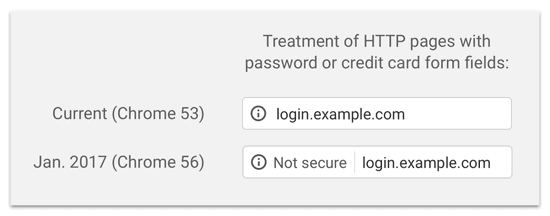
Is your website displaying that pesky not secure warning on Chrome?
If so you might have missed a recent update where chrome browsers would start marking websites without an SSL certificate as not secure as of July 2018.
No idea what an SSL certificate is?
All good, I’m going to explain that:
An SSL certificate creates a secure connection from a web server to a browser. Essentially what this means is it makes it harder for hackers to see the details being shared, such as personal information when completing forms, login details, credit card information and so on.
This used to only be required for e-commerce sites but with online privacy being such a large issue now google is encouraging this to improve online security for all websites.
A site without an SSL has a domain that starts with just HTTP and will display the not secure warning. A domain with an SSL starts with https and will show the domain as secure.
Why Your Website Really Needs an SSL Certificate
You can leave your site as is if you like it will continue to work, but here are a few very strong reasons your website needs an SSL:
- Customer Trust – when site visitors see the not secure warning this could create a bad impression or make them hesitant to interact with your website.
- Search engine ranking – In an effort to make the internet safer, google rewards sites that have an SSL certificate, making them rank better than those without.
- Security – The purpose of an SSL is to secure information being sent across the site, protecting your personal details and providing protection from phishing attacks.
So there are some pretty strong incentives to make the switch!
How to add SSL to your site
1. Get yourself an SSL certificate
Most hosting companies will provide one for free as part of their hosting package so it’s worth getting in touch with them to find out. Otherwise, you can expect to spend anywhere between $50 – $250 / year (in the majority of cases). Price varies with certain inclusions/ad-ons that come with the certificate.
2. Install it on your website
After you have enabled the SSL for your domain, you then need to install it on your website. This can be done via a couple of methods;
a) via the use of a plugin that sets up redirects from HTTP to HTTPS. This is a quick and simple way to do it, however, you usually have to leave the plugin in place or it could create mixed content errors if you remove it afterward. Furthermore, having some redirects on your site is ok, but it can sometimes affect site performance and page rank.
b) A more permanent (and better solution) is to manually edit the WordPress files or do a fresh re-install of your site using the https protocol. You will most likely need the help of a developer to sort this out for you. If you would like our assistance please contact us.
Helpful Links
Here are some related articles you might find useful:
- Do SSL Certificates Affect Search Rankings? (A Data Driven Answer…)
Do you know that 68% of internet users believe that current laws for protecting their rights are not good enough? No wonder Google has taken a strict stance… - Is HTTPS Good for SEO
Does HTTPS impact SEO? Can it affect your rankings, traffic, and conversions? Click here to learn more about website security and its effects!
The post Website not secure? – Here’s how to fix it appeared first on Rivmedia Web Design.
]]>The post Your website is your most important online asset… isn’t it? appeared first on Rivmedia Web Design.
]]>Your website is your most important online asset… isn’t it?
For most businesses, it’s reasonable to think that your website is your most important online asset, but you would be wrong. Your domain name is, because no matter how awesome your site is, without the domain name no one will see it.
You might be screwing your face up now thinking how is this possible seeing as you got your domain name when your web designer built your site… But did you?
You would be surprised just how many domain names out there aren’t actually owned by the business, but rather by their web designer. So technically, this means that you have no control over your own website.
You might not realise yet just how big a deal this is but consider this one scenario; if your web designer (and owner of your domain) closes their business, who is going to make sure your domain (and probably website hosting too) is kept active?
If payments aren’t made and it lapses, your website goes down, and as the domain and hosting accounts aren’t in your name to rectify this… well you’re in a bit of a pickle!
Have I got your attention? Great, then please keep reading:
When creating a new website, many people will first find themselves a web designer and let them take it from there. One major aspect of creating a new website though is purchasing a domain name and hosting; the importance of which is often grossly underestimated.
If you’re not 100% clear with what the above terms mean, I’ll quickly explain before we delve further:
- A “domain name” is the address by which people visit your website, for example, www.yourwebsite.com. You have to purchase it through a domain registrar and pay an annual fee to keep it. Your domain name is just a name, it is not your website;
- For that, you will need “web hosting” to attach your domain name to. Your web hosting account is where all the files that create your website are stored and also requires on-going payments to remain active.
It’s similar to when you get a phone number; you’re given a number such as (equivalent to your domain name) and then you purchase a monthly phone plan to host that number (equivalent to your web hosting). You have to have both; one doesn’t work without the other.
For most people new to websites, purchasing a domain name and hosting can be a little daunting, so the task is carried out by their web designer, but as such, it is often done in their name, not their client’s and the consequences of this aren’t always explained fully or the client may not even be aware.
At Rivmedia we insist that all of our clients manage their own domain name and hosting as we believe it is in their best interests to do so. Here’s why:
- Firstly, if you buy something directly rather than through a middle man you will save money which is an obvious advantage
- Your domain name is an asset, it has value; it is very much a part of your business as your company name, logo, and so on, so why would you want it owned by anyone else?
- With the above in mind, what if you were to sell your business down the track? The website would obviously be included in the sale but if you don’t actually own your website’s domain and/or hosting… Well, that’s going to complicate things.
- What happens if your designer closes their business, retires, or as sometimes sadly happens, just disappears and never returns your emails or phone calls? How are you going to ensure your domain and hosting stay active?
- Or furthermore, what if you want a redesign of your site but through a different designer, or want to move your hosting elsewhere if you’re unhappy with it or simply found a better deal?
All of the above can, and has happened.
If you aren’t in control of your domain and/or web hosting, moving to new providers becomes that much more complicated if the account isn’t in your name. If we refer back to our phone analogy, imagine trying to call Telstra to change your phone plan when you aren’t the account holder?! Ummm… nightmare!
Unfortunately, I have been contacted several times by clients who have found themselves in this very situation, and believe me if you can avoid it, you should!
At this point, I do want to make very clear that I am not trying to tarnish other designers and I’m not saying that those who purchase your domain and/or hosting are wrong or unprofessional. In the majority of cases, they’re just trying to make the process of getting your new website easier.
Regardless, I personally don’t agree with this for the above reasons. In short, by taking ownership yourself you save money and a valuable part of your business is owned by you, not your web designer.
My clients can also have peace of mind knowing that in the future should I happen to move away from web design (I don’t foresee this happening anytime soon but you never know!) they won’t be left in the lurch. They will own and have full control over their domain and hosting so they will not have to go through the frustrating and sometimes costly process of transferring ownership.
Conclusion
For those just starting out:
I strongly urge you to own your domain and hosting from the start, purchasing them is actually much easier than you think, and we’re happy to walk you through it step by step. Afterward, you can give access to your domain and hosting to whoever you please, such as a web designer to build your site for you but at the end of the day, you will always have ownership and control over them.
For those who already have a website:
If you don’t own your domain and/or hosting, you will have to contact your designer and request that they transfer ownership to you, sometimes administration fees may apply.
In most cases, your designer will hopefully oblige but sadly there are the odd few that may hold your domain hostage and you might have to take the matter further with the domain registrar (where the domain was registered).
For your hosting, how you handle this can vary depending on who the hosting is set-up through (your designer’s own hosting, reseller account, etc), but in most cases, you will have to cancel the hosting you have set up with your designer and create your own account. Transferring the website is a whole other issue and in most cases will require professional assistance, so be prepared that there will be costs involved there too.
I hate ending articles on a negative tone but sadly this is the nature of the situation you could face if you don’t own your domain and/or hosting. So again, my advice is to avoid it to begin with or if you’re already in this situation and would like help, the first article below is very informative or you are welcome to get in touch with me and we can discuss some options.
More Helpful Links
Here are some related articles you might find useful:
- How to Rescue Your Website from the Clutches of a Bad Web Designer or Bad Web Host:
Learn how to move your website without the cooperation of your existing web host or web designer. - If you want to lose control of your business, let your web designer buy your domain name:
If you let your web designer buy your domain name you have effectively transferred control of your business to them. - Don’t Let Your Web Designer Own Your Domain and Accounts:
We’re currently working with two businesses who are suffering because they don’t own their domains; their web designers do. Both are trying to move their websites, but they’ve hit a roadblock because they don’t own their domains.
The post Your website is your most important online asset… isn’t it? appeared first on Rivmedia Web Design.
]]>The post Do you have a mobile-friendly website? appeared first on Rivmedia Web Design.
]]>Mobile-friendly website:
How does yours measure up?
You may already be aware that your website should… no must be mobile-friendly these days.
Not only will Google penalise your site in their search results if it isn’t, but in the fast-paced, impatient society we live in, visitors to your site might punish you too.
When a website isn’t mobile responsive you’re forced to have to try and zoom in to be able to read small text, links are a pain to click on and sometimes content isn’t even viewable on the screen.
As a result, most users get frustrated, give up, and leave.
So not only are these websites losing customers but this can also affect what’s called “bounce rate.” Basically this is a percentage that is calculated based on how much time a visitor stays on your site. The longer they stay, the better the bounce rate which is another factor that contributes to how your website shows up in search engine results.
If people are abandoning your site quickly, google will see that as a sign that your website isn’t very useful and your rankings can drop even further.
The solution is straightforward; your website simply has to be mobile-friendly, or be prepared to suffer the consequences.
Some developers are able to convert a website to a mobile-friendly one, but often it’s just easier to start again and a fresh look never hurts anyway.
Yes, it does mean you have to spend more money, but what will it cost you if you don’t?
More Helpful Links
Here are some related articles you might find useful:
- Mobile-Friendly Test – This test will analyze a URL and report if the page has a mobile-friendly design.
- Google Webmaster Central Blog – Helping users find mobile-friendly pages
Need help ensuring you have a mobile-friendly website?
Rivmedia Web Design specialises in creating and maintaining high-quality, purpose-driven websites that convert visitors into customers. Get in touch with us today and let’s chat about how you can get the most out of your website.
The post Do you have a mobile-friendly website? appeared first on Rivmedia Web Design.
]]>