The post Website not secure? – Here’s how to fix it appeared first on Rivmedia Web Design.
]]>Website not secure? – Here’s how to fix it
Is your website displaying that pesky “not secure” warning on Chrome? We explain what this means and how to secure your website.
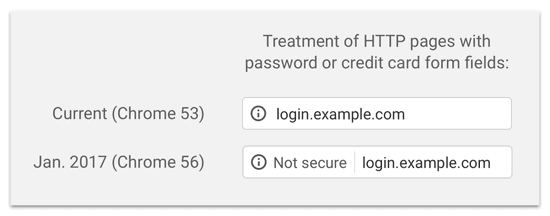
Is your website displaying that pesky not secure warning on Chrome?
If so you might have missed a recent update where chrome browsers would start marking websites without an SSL certificate as not secure as of July 2018.
No idea what an SSL certificate is?
All good, I’m going to explain that:
An SSL certificate creates a secure connection from a web server to a browser. Essentially what this means is it makes it harder for hackers to see the details being shared, such as personal information when completing forms, login details, credit card information and so on.
This used to only be required for e-commerce sites but with online privacy being such a large issue now google is encouraging this to improve online security for all websites.
A site without an SSL has a domain that starts with just HTTP and will display the not secure warning. A domain with an SSL starts with https and will show the domain as secure.
Why Your Website Really Needs an SSL Certificate
You can leave your site as is if you like it will continue to work, but here are a few very strong reasons your website needs an SSL:
- Customer Trust – when site visitors see the not secure warning this could create a bad impression or make them hesitant to interact with your website.
- Search engine ranking – In an effort to make the internet safer, google rewards sites that have an SSL certificate, making them rank better than those without.
- Security – The purpose of an SSL is to secure information being sent across the site, protecting your personal details and providing protection from phishing attacks.
So there are some pretty strong incentives to make the switch!
How to add SSL to your site
1. Get yourself an SSL certificate
Most hosting companies will provide one for free as part of their hosting package so it’s worth getting in touch with them to find out. Otherwise, you can expect to spend anywhere between $50 – $250 / year (in the majority of cases). Price varies with certain inclusions/ad-ons that come with the certificate.
2. Install it on your website
After you have enabled the SSL for your domain, you then need to install it on your website. This can be done via a couple of methods;
a) via the use of a plugin that sets up redirects from HTTP to HTTPS. This is a quick and simple way to do it, however, you usually have to leave the plugin in place or it could create mixed content errors if you remove it afterward. Furthermore, having some redirects on your site is ok, but it can sometimes affect site performance and page rank.
b) A more permanent (and better solution) is to manually edit the WordPress files or do a fresh re-install of your site using the https protocol. You will most likely need the help of a developer to sort this out for you. If you would like our assistance please contact us.
Helpful Links
Here are some related articles you might find useful:
- Do SSL Certificates Affect Search Rankings? (A Data Driven Answer…)
Do you know that 68% of internet users believe that current laws for protecting their rights are not good enough? No wonder Google has taken a strict stance… - Is HTTPS Good for SEO
Does HTTPS impact SEO? Can it affect your rankings, traffic, and conversions? Click here to learn more about website security and its effects!
The post Website not secure? – Here’s how to fix it appeared first on Rivmedia Web Design.
]]>